I keep my Zotero library in a GitHub repository. That solved the storage problem and created a new one: I could not read it on a tablet. Zotero has no Android client that writes back, and the repository is close to a gigabyte, because that is what a few thousand PDFs weigh.
ReadPaper is the answer to that. It opens a Zotero library straight from GitHub, shows the collections the way Zotero does, reads the PDFs, and puts highlights and comments on specific passages — written back into the Zotero files and committed to git.
A demo, three minutes
Browsing collections, opening a paper, highlighting, and then the part I did not plan when I started: presentation mode, drawing on a slide with a stylus, inserting a blank page mid-deck and writing on it. The deck being presented is my own Machine Learning slide deck, which is a fair test — if it cannot handle my own material it is not finished.
Cloning a gigabyte without cloning a gigabyte
A Zotero library in git is mostly attachments. The metadata — items, collections, notes — is small. So ReadPaper clones with --filter=blob:none and a sparse checkout that excludes the attachments folder entirely, then fetches one PDF at a time as you open it.
Measured on my own library: 23 MB and about fourteen seconds, against roughly 940 MB for a full clone. That is not a performance tweak. It is the difference between an app you can use on a mobile data plan and an app that does not exist.
Android has no git, so git got rewritten
On Linux, ReadPaper shells out to the git binary. On Android there is no binary to shell out to, so the same operations run over the GitHub REST API instead — trees, blobs, commits, refs.
The awkward part is knowing what changed. Git identifies a blob by sha1("blob <length>\0" + contents), so ReadPaper computes that itself and compares it against the tree GitHub reports. Cheap checks first — size and modification time — and the hash only when both of those moved. A push refuses outright if the remote head has moved since the last fetch. It never forces.
Byte-for-byte, and why that is correctness
ReadPaper writes back into Zotero's own JSON files. Matching Zotero's formatting exactly — tab indentation, keys in alphabetical order, children sorted by key, whole numbers without a trailing .0 — sounds like fussiness. It is not.
If the formatting drifts, adding one highlight rewrites the whole file, every sync becomes a diff nobody can read, and the first merge conflict is unresolvable. Matching it means one highlight adds one block. The round trip is verified against all 1,740 item files in my real library.
What it turned into
It started as a reader. Collections, search with operators like author:, year: and tag:, highlights and comments in Zotero's eight colours, an author facet panel, drag and drop between collections.
Then it grew a second half I had not planned:
- A whiteboard — multiple sheets, named colours, per-sheet paper size, saved as PDF.
- A stylus notebook where ink, text, images and shapes are all objects you can move, resize and rotate, with connectors that remember what they are attached to.
- A Markdown editor that renders Mermaid diagrams, converts to PDF with real selectable text, and converts PDFs back to Markdown.
- Presentation mode — full screen, pen, insert a blank page mid-deck, save, all without leaving it.
- A second root for standalone notes, beside the Zotero data rather than inside it.
Fourteen days, sixty-one commits, thirty tags.
Mermaid without a browser
The Markdown editor draws Mermaid diagrams itself — no WebView, no mermaid.js. Notes have to open on a tablet with no signal, and a JavaScript engine to draw ten boxes is a price not worth paying.
Two consequences I like. A diagram type it does not understand is refused with a reason and the source shown as written, because a diagram drawn wrongly misleads worse than code read honestly. And the layout is computed once and used twice — by the screen painter and by the PDF writer — because if each computed its own, the diagram on screen and the diagram in print would differ and the person printing would have no way to tell which was right.
The bug that quietly disabled the headline feature
A const Spacer() inside AlertDialog.actions. Flutter renders those actions in an OverflowBar, which does not accept Expanded, so every build of that dialog threw.
The dialog was the one for Highlight + comment. So the feature the whole app exists for, plus notes and annotation editing, never worked at all. Four widget tests now stand guard, including one that checks the Save button is still reachable when the keyboard is up.
Things only a real device teaches
Palm rejection is not a heuristic. The gesture detector is given supportedDevices containing the stylus alone, so a resting hand never reaches the canvas at all. Mouse stays allowed. Stylus pressure is read from raw pointer events, because the gesture detector does not hand it over — and only for the stylus, since many screens report a constant pressure for fingers.
InteractiveViewer had to go, and the cost was measurable. Its recogniser competes for one-finger drags, and the result was that the first sixty pixels of every stroke were lost before the canvas won the arena — and short drags, like a single eraser tap, never arrived at all. Pinch is now computed straight from pointer events.
A bug that looked like a missing feature. "Notes cannot be landscape" turned out to be: the paper-size button exists, but its bar sat underneath the system navigation bar. Visible, with its touches taken by the system, and the person using it reasonably concluded the feature was not there.
Android's file picker hands you a copy. Not the original file — a copy in the app's cache. So "save back to this file" is impossible, and the menu says what is true instead: Save PDF — choose where.
Update, 4 October 2026: v0.23.7
A week after this was first written, ReadPaper is no longer an Android app with a Linux build on the side.
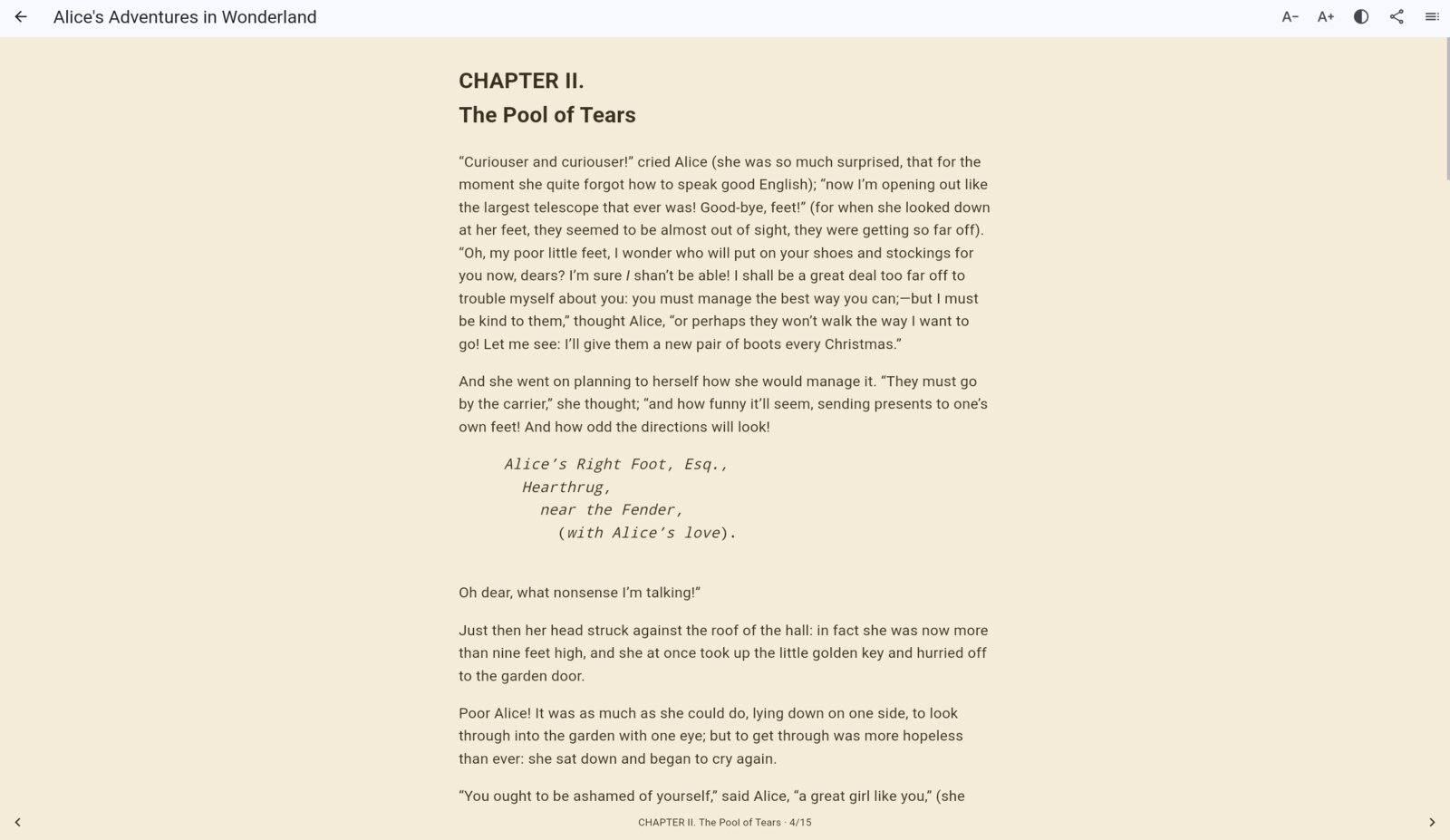
The new EPUB reader, showing a public-domain book from Project Gutenberg.
It runs everywhere I write
- Linux — a portable tarball, a
.deb, and a PKGBUILD for Arch and CachyOS. Built inside a Debian 12 container, then installed and launched on Debian 12, Ubuntu 22.04, Ubuntu 24.04 and Arch. That caught two bugs my own machine could never show: a glib symbol that only exists from 2.80, and libEGL.so.1, which Flutter opens with dlopen, so no dependency tool ever finds it.
- Windows — a portable zip, built on a real Windows runner because Flutter cannot cross-compile it. Running the tests there paid for itself at once: nine failed that pass on Linux. Repository paths were built with backslashes, so every file looked changed; and a file edited in the same filesystem clock tick as the sync record — git calls it racily clean — was never seen as changed at all.
- iPhone and iPad — an unsigned
.ipa built on a macOS runner, installable with a free Apple ID and Sideloadly, no Mac needed. The signature lasts seven days; that is the price of not paying Apple.
New things to do with a library
- EPUB, with a parser written for it: one chapter per screen so the table of contents always lands at a chapter's start, font size, three page colours, the position remembered per book, and ReadPaper listed in Android's "Open with" for ebooks. Two Project Gutenberg traps turned up on the tablet: a self-closing
<a id/> that HTML reads as a link never closed, turning a whole chapter blue, and covers wrapped in <svg><image>.
- A duplicate finder — DOI first, then ISBN (ISBN-10 converted to ISBN-13 before comparing), then title with year and first author's surname. On my library: 1,741 items, 147 groups holding 384 copies, in 65 ms. One paper was in there seven times. It deliberately does not merge: it shows each group side by side with the reason, marks the copy carrying annotations as the one to keep, and stops.
- Library statistics — per year, per type, the names that appear most, and how many items actually have their PDF. That last number turns red below 50%, because a library that is half missing its files is a reading list.
- Groundwork for citations — Zotero items converted to CSL-JSON, and CSL locales and styles read the way Zotero reads them, so a bibliography from ReadPaper will match one from Zotero. On the way I learned that the official style repository has no
vancouver.csl at all: two different dependent styles share the name. Styles are now added by a tool that names each file after the id inside it.
- Share from every document — notes, notebooks and whiteboards too, sent as PDF — and a new collection can be created straight from the "Add to collection" sheet.
Fixes that came from using it
- Changing pen colour no longer recolours strokes already drawn, a palm resting on the screen no longer cuts a stylus stroke short, and a finger can scroll the page while the pen is active.
- A 57 MB textbook stored in Git LFS stopped every sync at 4%, with a message telling me to pull first — which could never help. LFS attachments are now never pushed through the API (that would overwrite the pointer and damage the repository), GitHub's own reason is shown, and one rejected file no longer holds back the rest of the queue.
- Upload timeouts grow with the file size, instead of thirty seconds for everything.
- On desktop, "Add to collection" failed at
git add, because a new PDF sits outside the sparse checkout (fixed in v0.23.7).
It is documented now, too: a feature list, a user guide and a technical guide, in the repository's docs/ folder.
Update, 11 October 2026: v0.26.0
Seventeen releases in a week. The short version: ReadPaper stopped being only a reader and started being the place a paper gets cited from.
Citations in Word and OnlyOffice
- ReadPaper desktop is now a citation source. A Word add-in and an OnlyOffice plugin talk to a small server ReadPaper runs on
127.0.0.1: search a paper, pick one of your highlights as the page locator, insert the citation and the bibliography. The engine is citeproc-js, the same one Zotero uses, so APA and IEEE come out the way Zotero would write them — including the fix that stopped APA writing "Article N" where a journal article's pages belong.
- BibTeX — export a whole collection, or copy one paper's entry, with citation keys that stay stable between exports.
Annotations that behave like Zotero's
- Sticky notes are now a small marker on the page, as in Zotero (
annotationType: note); a click opens the note in a balloon, another click closes it.
- Text on the page can be rotated and resized from its handles, and the angle and size are stored the way Zotero stores them. The rotate and resize handles had never actually responded before — for ink too.
- Annotations can move to another page (drag, and the viewer scrolls at the edge), or be copied, cut and pasted. Images can be pasted onto a page from the clipboard.
- The pen gained an eraser (the stylus's own eraser end works too), white and black ink, and Redo beside every Undo — Ctrl+Z, Ctrl+Shift+Z and Ctrl+Y on desktop. The whiteboard got the same.
- A saved PDF stays a PDF. Saving used to turn every page into a picture, so the text could no longer be searched or copied. Now the original pages are left alone and the annotations are added on top: highlights as transparent fills, strokes as vectors, text as text, comments as PDF sticky notes. The first save always asks for a new name, so the original file is safe.
- Annotations on PDFs in Notes save themselves in Zotero's format, and "Add to collection…" turns such a PDF into a Zotero item with all its annotations, readable in Zotero after the next push.
Many repositories, and git that no longer jams
- Sign in with GitHub, no token. A short code, github.com/login/device, Authorize — then pick a repository or have ReadPaper create a private one. Accounts are remembered, and more than one can be used.
- Several libraries side by side: each shows its item count, disk use, unsent changes and new commits on GitHub, and papers, collections and notes can be moved or copied between them, annotations and PDFs included.
- Rename, move and delete collections and folders. A collection keeps its Zotero key, so Zotero still recognises it — tested on a copy of my 1,741-item library, where the diff touched only what had changed.
- Conflicting pulls are resolved, not left hanging. A pull that stopped on a conflict used to leave a half-done rebase behind, after which every pull failed and the next save committed conflict markers into the JSON. Now the stuck state is backed up and recovered, collections and items are merged per object so edits from two devices both survive, and a conflicting Markdown note keeps the GitHub version beside it.
- Changes no longer become one commit each. They wait for Send, which commits them together with a summary you can edit.
A real desktop app
- Windows installer into Program Files, which recognises an existing install and offers Update, Repair, Modify or Remove, and carries its own git (MinGit and git-lfs), so Git for Windows is no longer required. Settings and clones are never touched.
- Linux: the packages now depend on git, and Arch and CachyOS get a one-step installer that builds a real
readpaper-bin pacman package instead of copying files into /opt.
- Drag files and whole folders in from the file manager: a folder becomes a collection, its subfolders sub-collections, and any file type is accepted. CSV, TSV and Excel open in a table viewer.
- Highlighting with the mouse on desktop, and the file picker that used to fail silently — on GNOME with a tiling window manager the dialog shrank the window and the chosen files were dropped.
Indonesian and English
The whole interface is now in both languages, chosen on the Repositories screen (Indonesian, English, or follow the system). The Windows installer is bilingual too.
And it is tested where it runs: end-to-end tests on a real Windows machine in CI and on Linux — highlighting, comments, notes, collections, Send and Pull, Office citations — the Windows installer installed, reinstalled and removed, and the Linux packages installed on Debian 12, Ubuntu 22.04 and 24.04, and Arch.
Update, 13 October 2026: v0.27 and v0.28
Two days, two features I had been waiting for since the first time I presented from the tablet.
Presenter mode, with a separate audience screen (v0.27)
- In presentation mode, one button opens the slides on a second monitor or projector on Windows and Linux, or on an Android tablet's external display over HDMI, USB-C or cast. The audience sees only the slide, full screen. With a single monitor it becomes a window you drag onto the projector.
- Everything on the slide reaches the audience screen at once: page turns, ink — including the stroke still being drawn — text, images, undo and redo, a new blank page.
- The presenter screen shows the next slide, speaker notes per slide that only I can see, a running timer, a black screen and a full-slide view. The notes sync through the repository like everything else and wait for Send.
- Clicker support over Bluetooth or USB: the usual forward and back keys, B or full stop for a black screen, Esc to leave. It works even when the audience window has focus, and on the tablet without touching the screen first.
- A laser pointer: mouse, finger or stylus becomes a red dot with a fading trail, shown on the audience screen too. The trail runs from none to two seconds, and is remembered.
v0.27.1 fixed the two things that showed up in front of an audience: the pointer button shifting under the cursor as it switched on, and a selected annotation's handles and Copy/Cut bar appearing on the projected slide.
Search inside documents, and Office files without Office (v0.28)
- Find in the open document — the magnifier or Ctrl+F in PDFs, EPUBs, Word and PowerPoint files and tables. Every match in yellow, the current one in orange, "3 of 12", Enter and Shift+Enter to move, F3, Esc. In an EPUB it searches the whole book and changes chapter by itself; in a spreadsheet, every sheet.
- Word (.docx, .doc, .rtf) is read as flowing text on a white page: headings, emphasis, lists, tables, images, links.
- PowerPoint (.pptx, .ppt, .pps) is drawn slide by slide in its original layout — text boxes, images, shapes, tables, backgrounds, theme colours, styles from the master — with the speaker notes under each slide.
- Old Excel (.xls) opens as a table with sheets, like .xlsx. The old binary formats are read from the file itself; for old Word and PowerPoint, text only.
- The content decides, not the extension: an ".xls" that is really .xlsx or HTML — which many web apps export — and a ".doc" that is really RTF or HTML still open.
- Exact view: on a desktop with LibreOffice, one button converts the document to PDF and opens it in the reader, where it can be searched, highlighted, drawn on and presented with the audience screen.
- ReadPaper now appears in "Open with" for Word, PowerPoint and Excel on Android, iOS, Linux and Windows.
Tested against 604 real Office files: 593 were read, and the rest were encrypted or not Office files at all.
Update, 14 October 2026: v0.29.0
This one is mostly about the tablet catching up with the desktop.
- Add folder… on Android. The menu was hidden on tablets and phones, because since Android 11 the path a folder picker returns cannot be read directly. Now the folder comes through the system picker (tap Allow), its contents — subfolders included — are copied into the cache, and from there it goes through the same import as on the desktop. Subfolders become sub-collections.
- Equations, matrices and EMF drawings in PowerPoint and Word. MathType and Equation Editor objects, and vector logos, are stored as EMF, which Flutter cannot draw — so they simply vanished from slides. ReadPaper now reads and draws EMF itself.
- Circles used to mark a word on a slide stay transparent instead of being filled with a solid theme colour.
- Present, read mode and Save as PDF — without LibreOffice. Android has no LibreOffice, so until now a PowerPoint file could not be presented there. Slides are now drawn as they appear on screen and turned into a PDF, with invisible text so they can still be searched, and opened in the PDF reader: Present goes straight to presentation mode, Open as PDF gives read mode, page scrolling and the marking tools. Save as PDF… works for Word, PowerPoint and tables (Excel, CSV).
- Notes behave like folders. A sub-collection of notes used to be reachable only from the tree in the left panel — which on a phone is hidden in a drawer. Opening a notes collection now lists its sub-collections at the top, then its files, with a Back to … row, like a file manager.
- Library, Notes and the readpaper folder each get their own faint background colour in the left panel, so you can tell where one ends and the next begins.
Update, 14 October 2026 (later): v0.30.0 and v0.30.1
Two more releases the same day, mostly things that came up while using the tablet for real.
- Presenting fits the slide properly. The slide is whole and centred as soon as presenting starts, at every slide size — a 4:3 deck on Linux used to come out too large and slide downwards. The bottom toolbar (pen, pointer trail, save and the rest) no longer covers the slide; the slide is fitted above it.
- Notes get details, like My Library. Tapping a note now shows its details panel instead of opening the file straight away. Edit details adds author, date, tags, source and a description, and those details sync with everything else. The file opens with Open, or with the open icon at the end of the row.
- Sending large files from the APK. Files over 20 MB — a big PowerPoint deck, say — used to be rejected by GitHub with "Sorry, your input was too large to process". They now go up as a git pack, the way
git push does it, batched up to 100 MB per push with the request streamed so the tablet's memory holds up. Anything stuck in the queue goes out on the next Send. GitHub's own limit of 100 MB per file still applies.
- Large Excel files open, on the tablet too (v0.30.1). A sheet with hundreds of thousands of rows — an export holding 300 MB of XML — used to spin forever; it is now read as a stream and opens in about four seconds, showing the first 5,000 rows. Checked against 879 real .xlsx files: the same result as the old reader, except two that are now more correct. A truncated or broken .xlsx is reported as broken rather than shown as an empty table.
Update, 23 October 2026: v0.31 and v0.32
Two releases that make ReadPaper feel more like a desk than a single page: documents in tabs, two of them side by side, and annotations made in other apps finally showing up.
- Document tabs, like Zotero (v0.32.0). The library is the first tab; every PDF, EPUB, Markdown file, notebook, table and Office document opens as its own tab. Opening the same file again picks the tab that is already there. ×, a middle click or Ctrl+W closes a tab, Ctrl+Tab switches. On a phone it stays one full screen.
- Two documents side by side. Move a tab to the right-hand panel — right-click the tab, use the split button at the end of the tab bar, or just drag it. The divider can be moved, and PDF zoom follows the panel width. Make notebook now opens a new tab, so a paper and its notes can sit next to each other.
- Annotations from other apps are read. Highlights, underlines, strike-outs, sticky notes, text boxes and ink stored inside the PDF itself — by Acrobat, Okular or a script, which until now only Zotero could see — appear in the annotation panel with their comment and author, locked. A sticky note on the page can be tapped to read it.
- The reader reloads itself when the annotations or the PDF change on disk — after a Pull or Sync, a script, another app — without closing and reopening. (v0.32.1 stops it from reloading its own annotations right after you edit them.)
- The original file, not just a PDF (v0.31.0, v0.32.0). The Word, PowerPoint, Excel and table viewers have one Download button: Original file (.docx/.xlsx/…) first, As PDF second. A .docx stays a .docx. On a tablet or phone this is how a file gets out to Downloads or another app.
- LibreOffice / OpenDocument files open (v0.31.0), on every platform including the APK: .odt flows like Word, .odp shows each slide in place with its speaker notes and can be presented or turned into a PDF, .ods opens in the table viewer. ReadPaper shows up under “Open with” for all three.
- On Linux with GNOME and Forge, newly added files and folders appear straight away, without minimising the window first. The Windows and iOS builds, missing from 0.32.0 because of a single analyser warning, are back in 0.32.1.
Update, 11 November 2026: v0.33 to v0.35
Four releases. Citations now work in every editor I actually write in, files changed outside the app show up by themselves, and from 0.35 ReadPaper updates itself.
- Citations in four editors (v0.33.0). Besides Word and OnlyOffice there is now a LibreOffice Writer extension (
.oxt, LibreOffice 7.6+) and a Google Docs add-on with the same side panel as Word. Insert and edit citations while typing a search, several items at once, page, prefix and suffix, hide the author, pick an annotation; then the bibliography, update all, and change style. APA 7, IEEE, Vancouver, Harvard, MLA 9, Chicago, AMA 11 and NLM are rendered by citeproc-js, the same engine Zotero uses, so all four editors produce the same output.
- A bibliography that cannot go stale. It is always built from the citations that are really in the document: delete or shorten a citation and its entry leaves the bibliography and the “not cited” list straight away — a classic Zotero annoyance that simply cannot happen here.
- New files appear without restarting (v0.34.0). The library and notes reload themselves when they change on disk from outside ReadPaper: a
git pull in a terminal, a Zotero export, files copied in by a file manager. Every 3 seconds on desktop, 15 on a tablet, and immediately when the app comes back to the front. From v0.35.0 a Pull shows its collections, folders and files at once too, even when it ends in an error halfway.
- Files GitHub refuses (v0.34.0, tablet). The sync details have a Refused tab listing every file GitHub would not take, with its size and the reason (usually over 100 MB). Each one can be excluded (kept on the device, never sent), deleted from the device, or retried.
- Friendlier for screen sharing over Google Meet (v0.34.0). The tab bar can move to the bottom, a Collections button sits under the paper and note lists, and a long press on a paper offers “Open in new tab” or “Open in right panel”.
- Ink stays on its slide (v0.34.1). Inserting a blank page in the middle of an annotated deck used to shift every later drawing one slide forward. Annotations, labels and presenter notes now move with their pages, and the blank page is written into the PDF itself. Before a file changes for the first time ReadPaper offers to keep a copy of the original (
…-asli.pdf).
- Updates from inside the app (v0.35.0). ReadPaper checks GitHub releases on start and every six hours, shows a card in the corner, and installs the build that matches how it was installed: the APK through Android's installer, a silent
setup.exe on Windows, the tarball replaced in place, the .deb through apt, the Arch package through pacman. Every download is checked against its sha256. From a terminal: readpaper --perbarui. The notice can be switched off, or one version skipped. (This works from 0.35 onward; getting to 0.35 is still a normal install.)
- Smaller things (v0.35.0). On Android with three-button navigation the bottom row is no longer hidden behind the system bar; zoom buttons step about 1.25× instead of doubling, with fit-page and fit-width kept as steps; and every document reopens at its last zoom.
Where it stands
- The Android APK is signed with a debug key, so Android warns about an unknown source on install. The Windows installer and zip and the iOS
.ipa are unsigned: SmartScreen warns, and iOS needs re-signing every seven days. iOS cannot update itself; it is sent to the release page.
- EPUBs can be read and searched, but not yet highlighted. Office and OpenDocument files are read-only — they can be downloaded as the original or as a PDF, not edited — and old .doc and .ppt files show their text only.
- Git LFS works on desktop, not yet on Android.
- Citations in Word, OnlyOffice and LibreOffice need ReadPaper desktop running on the same computer; on Linux it renders citations with JavaScriptCore (
libjavascriptcoregtk-4.1-0 on Debian/Ubuntu, webkit2gtk-4.1 on Arch).
- Large spreadsheets show their first 5,000 rows only.
Get it
AGPL-3.0-or-later. Use it, change it, sell it — but anyone you hand a copy to, including over a network, has the right to the source under the same terms. Contributions take a git commit -s sign-off and no CLA.
- github.com/situkangsayur/readpaper
- Latest release — v0.35.0: Android APK (about 32 MB, arm64), Windows installer and portable zip, Linux tarball,
.deb, PKGBUILD and the Arch installer, the unsigned iOS .ipa, and the citation plugins for OnlyOffice, LibreOffice and Google Docs. Already on 0.35? ReadPaper will offer the next one itself.
There is a companion for the other half of the work: WritePaperTeX, which compiles LaTeX on the same tablet.
Library Zotero saya tersimpan di repositori GitHub. Itu menyelesaikan soal penyimpanan dan melahirkan soal baru: saya tidak bisa membacanya di tablet. Zotero tidak punya klien Android yang bisa menulis balik, dan repositorinya mendekati satu gigabita — karena memang begitulah berat beberapa ribu PDF.
ReadPaper adalah jawabannya. Ia membuka library Zotero langsung dari GitHub, menampilkan koleksinya seperti Zotero menampilkannya, membaca PDF-nya, dan menaruh stabilo serta komentar pada bagian tertentu — ditulis balik ke berkas Zotero dan langsung di-commit ke git.
Demonya, tiga menit
Menelusuri koleksi, membuka paper, menstabilo, lalu bagian yang tidak saya rencanakan waktu memulai: mode menyajikan, menggambar di atas slide dengan stylus, menyisipkan halaman kosong di tengah deck lalu menulis di situ. Deck yang disajikan itu slide Machine Learning saya sendiri — ujian yang adil: kalau materi saya sendiri saja tidak tertangani, berarti belum selesai.
Mengklon satu gigabita tanpa mengklon satu gigabita
Isi terbesar library Zotero di git adalah lampiran. Metadatanya — item, koleksi, catatan — kecil. Jadi ReadPaper mengklon dengan --filter=blob:none dan sparse checkout yang membuang folder lampiran seluruhnya, lalu menarik satu PDF saja ketika papernya dibuka.
Terukur pada library saya sendiri: 23 MB dan sekitar empat belas detik, dibanding kira-kira 940 MB untuk klon penuh. Itu bukan penghalusan kinerja. Itu selisih antara aplikasi yang bisa dipakai dengan paket data biasa dan aplikasi yang tidak ada gunanya.
Android tidak punya git, jadi git-nya ditulis ulang
Di Linux, ReadPaper memanggil biner git. Di Android tidak ada biner untuk dipanggil, jadi operasi yang sama dijalankan lewat GitHub REST API — trees, blobs, commits, refs.
Bagian yang merepotkan adalah mengetahui apa yang berubah. Git mengenali blob lewat sha1("blob <panjang>\0" + isi), jadi ReadPaper menghitungnya sendiri lalu membandingkannya dengan pohon yang dilaporkan GitHub. Pemeriksaan murah dulu — ukuran dan waktu ubah — dan hash hanya kalau keduanya bergerak. Push langsung menolak kalau head di remote sudah maju sejak fetch terakhir. Tidak pernah memaksa.
Sama persis sampai ke byte, dan itu soal kebenaran
ReadPaper menulis balik ke berkas JSON milik Zotero sendiri. Menyamai format Zotero persis — identasi tab, kunci urut abjad, anak diurutkan menurut kunci, bilangan bulat tanpa .0 di belakang — terdengar seperti kerewelan. Bukan.
Kalau formatnya menyimpang, menambah satu stabilo berarti menulis ulang seluruh berkas, setiap sinkronisasi jadi diff yang tak terbaca siapa pun, dan konflik merge pertama tidak akan bisa diselesaikan. Menyamainya berarti satu stabilo menambah satu blok. Perjalanan bolak-baliknya diuji terhadap seluruh 1.740 berkas item di library saya yang sungguhan.
Berubah jadi apa
Awalnya cuma pembaca. Koleksi, pencarian beroperator seperti pengarang:, tahun:, dan tag:, stabilo dan komentar dalam delapan warna Zotero, panel facet pengarang, seret-lepas antar koleksi.
Lalu tumbuh separuh lagi yang tidak saya rencanakan:
- Papan tulis — berlembar-lembar, warna bernama, ukuran kertas per lembar, disimpan sebagai PDF.
- Buku catatan stylus, tempat tinta, teks, gambar, dan bangun datar semuanya jadi objek yang bisa digeser, diubah ukuran, dan diputar, dengan penghubung yang mengingat apa yang disambungkannya.
- Penyunting Markdown yang menggambar diagram Mermaid, mengubahnya jadi PDF dengan teks sungguhan yang masih bisa dicari, dan membalik PDF jadi Markdown.
- Mode menyajikan — layar penuh, pena, sisip halaman kosong di tengah deck, simpan, semuanya tanpa keluar dari mode itu.
- Akar kedua untuk catatan lepas, bersebelahan dengan data Zotero, bukan di dalamnya.
Empat belas hari, enam puluh satu commit, tiga puluh tag.
Mermaid tanpa peramban
Penyunting Markdown-nya menggambar diagram Mermaid sendiri — tanpa WebView, tanpa mermaid.js. Catatan harus bisa dibuka di tablet yang sedang tanpa sinyal, dan mesin JavaScript untuk menggambar sepuluh kotak adalah harga yang tidak pantas dibayar.
Dua akibatnya saya sukai. Jenis diagram yang tidak dikenali ditolak dengan menyebut sebabnya dan sumbernya ditampilkan apa adanya, karena diagram yang salah gambar lebih menyesatkan daripada kode yang terbaca jujur. Dan tata letaknya dihitung sekali lalu dipakai dua kali — oleh pelukis layar dan oleh penulis PDF — sebab kalau masing-masing menghitung sendiri, diagram di layar dan di cetakan akan berbeda, dan yang mencetak tidak akan tahu mana yang benar.
Bug yang diam-diam mematikan fitur utamanya
Sebuah const Spacer() di dalam AlertDialog.actions. Flutter merender bagian itu dengan OverflowBar, yang tidak menerima Expanded, jadi setiap kali dialog itu dibangun ia melempar eksepsi.
Dialog itu adalah dialog Stabilo + komentar. Jadi fitur yang menjadi alasan seluruh aplikasi ini ada, ditambah catatan dan penyuntingan anotasi, tidak pernah bisa dipakai sama sekali. Sekarang dijaga empat widget test, termasuk satu yang memastikan tombol Simpan masih bisa diketuk saat papan tik naik.
Hal-hal yang hanya diajarkan perangkat sungguhan
Penolak telapak tangan bukan heuristik. Pengenal gerakannya diberi supportedDevices berisi stylus saja, jadi tangan yang bersandar tidak pernah sampai ke kanvas. Tetikus tetap diizinkan. Tekanan stylus dibaca dari peristiwa pointer mentah, karena pengenal gerakan tidak menyerahkannya — dan hanya untuk stylus, sebab banyak layar melaporkan tekanan tetap untuk jari.
InteractiveViewer harus dibuang, dan ongkosnya terukur. Pengenalnya bersaing memperebutkan seretan satu jari, dan akibatnya: sekitar enam puluh piksel pertama setiap goresan hilang sebelum kanvas menang di arena — dan seretan pendek, seperti satu ketukan penghapus, tidak pernah sampai sama sekali. Cubitan sekarang dihitung langsung dari peristiwa pointer.
Bug yang menyamar sebagai fitur yang tidak ada. Keluhan "catatan tidak bisa mendatar" ternyata: tombol ukuran kertasnya ada, tapi bilahnya duduk di bawah bilah navigasi sistem. Terlihat, sentuhannya diambil sistem, dan yang memakainya wajar menyimpulkan fiturnya memang tidak ada.
Pemilih berkas Android menyerahkan salinan. Bukan berkas aslinya — salinan di cache aplikasi. Jadi "simpan balik ke berkas ini" mustahil, dan menunya berbunyi jujur: Simpan PDF — pilih tempatnya sendiri.
Pembaruan, 4 Oktober 2026: v0.23.7
Seminggu setelah tulisan ini pertama terbit, ReadPaper bukan lagi aplikasi Android dengan build Linux sebagai sampingan.
Pembaca EPUB yang baru, dengan buku domain publik dari Project Gutenberg.
Jalan di semua tempat saya menulis
- Linux — tarball portabel,
.deb, dan PKGBUILD untuk Arch dan CachyOS. Dibangun di dalam kontainer Debian 12, lalu dipasang dan dijalankan di Debian 12, Ubuntu 22.04, Ubuntu 24.04, dan Arch. Dari situ ketahuan dua bug yang tidak mungkin terlihat di mesin saya sendiri: simbol glib yang baru ada sejak 2.80, dan libEGL.so.1, yang dibuka Flutter lewat dlopen sehingga tidak pernah ditemukan perkakas dependensi mana pun.
- Windows — zip portabel, dibangun di runner Windows sungguhan karena Flutter tidak bisa mengompilasinya dari Linux. Menjalankan tesnya di sana langsung terbayar: sembilan tes gagal yang di Linux hijau. Jalur repositori dibangun dengan garis miring terbalik, jadi setiap berkas tampak berubah; dan berkas yang disunting dalam detak jam berkas yang sama dengan catatan sinkronisasi — git menyebutnya racily clean — tidak pernah terlihat berubah sama sekali.
- iPhone dan iPad —
.ipa tanpa tanda tangan yang dibangun di runner macOS, bisa dipasang dengan Apple ID gratis dan Sideloadly, tanpa perlu Mac. Tanda tangannya berlaku tujuh hari; itu harga tidak membayar Apple.
Hal baru yang bisa dilakukan dengan library
- EPUB, dengan pengurai yang ditulis sendiri: satu bab per layar supaya lompatan dari daftar isi selalu tepat di awal bab, ukuran huruf, tiga warna halaman, posisi yang diingat per buku, dan ReadPaper muncul di pilihan "Buka dengan" Android untuk ebook. Dua jebakan Project Gutenberg ketahuan di tablet:
<a id/> yang menutup sendiri dibaca HTML sebagai tautan yang tak pernah ditutup sehingga seluruh bab berwarna biru, dan sampul yang dibungkus <svg><image>.
- Pencari duplikat — DOI dulu, lalu ISBN (ISBN-10 diubah ke ISBN-13 sebelum dibandingkan), lalu judul bersama tahun dan nama belakang pengarang pertama. Di library saya: 1.741 item, 147 kelompok berisi 384 salinan, dalam 65 milidetik. Satu paper masuk tujuh kali. Ia sengaja tidak menggabungkan: kelompoknya ditampilkan berdampingan beserta alasannya, salinan yang punya anotasi ditandai sebagai yang pantas dipertahankan, lalu ia berhenti.
- Statistik library — per tahun, per jenis, nama yang paling sering muncul, dan berapa item yang PDF-nya benar-benar ada. Angka terakhir itu memerah di bawah 50%, karena library yang separuh berkasnya hilang adalah daftar bacaan.
- Fondasi sitasi — item Zotero diubah ke CSL-JSON, dan locale serta gaya CSL dibaca seperti Zotero membacanya, supaya daftar pustaka dari ReadPaper sama dengan yang dari Zotero. Di tengah jalan ketahuan bahwa repositori gaya resmi sama sekali tidak punya
vancouver.csl: dua gaya dependen yang berbeda memakai nama itu. Gaya kini ditambahkan lewat perkakas yang menamai berkas menurut id di dalamnya.
- Bagikan dari setiap dokumen — termasuk catatan, buku catatan, dan papan tulis, dikirim sebagai PDF — dan koleksi baru bisa dibuat langsung dari lembar "Tambahkan ke koleksi".
Perbaikan yang lahir dari memakainya
- Mengganti warna pena tidak lagi mewarnai ulang coretan yang sudah ada, telapak tangan yang bertumpu di layar tidak lagi memotong goresan stylus, dan jari bisa menggeser halaman selama pena aktif.
- Satu buku teks 57 MB yang tersimpan di Git LFS menghentikan setiap sinkronisasi di 4%, dengan pesan yang menyuruh menarik perubahan dulu — yang tidak akan pernah menolong. Lampiran LFS kini tidak pernah dikirim lewat API (itu akan menimpa penunjuknya dan merusak repositori), alasan dari GitHub sendiri yang ditampilkan, dan satu berkas yang ditolak tidak lagi menahan sisa antrean.
- Batas waktu unggahan kini sebanding ukuran berkasnya, bukan tiga puluh detik untuk semuanya.
- Di desktop, "Tambahkan ke koleksi" gagal di
git add karena PDF baru berada di luar sparse checkout (diperbaiki di v0.23.7).
Sekarang juga ada dokumentasinya: daftar fitur, panduan pengguna, dan panduan teknis, di folder docs/ repositorinya.
Pembaruan, 11 Oktober 2026: v0.26.0
Tujuh belas rilis dalam seminggu. Singkatnya: ReadPaper tidak lagi sekadar pembaca, tetapi juga tempat sebuah paper disitasi.
Sitasi di Word dan OnlyOffice
- ReadPaper desktop kini menjadi sumber sitasi. Add-in Word dan plugin OnlyOffice berbicara dengan server kecil yang dijalankan ReadPaper di
127.0.0.1: cari paper, pilih salah satu stabilo sebagai penanda halaman, lalu sisipkan sitasi dan daftar pustaka. Mesinnya citeproc-js, sama dengan Zotero, jadi APA dan IEEE keluar seperti yang ditulis Zotero — termasuk perbaikan yang menghentikan APA menulis "Article N" di tempat halaman artikel jurnal.
- BibTeX — ekspor satu koleksi utuh, atau salin entri satu paper, dengan kunci sitasi yang tetap sama antar-ekspor.
Anotasi yang berperilaku seperti Zotero
- Catatan tempel kini berupa penanda kecil di halaman, seperti di Zotero (
annotationType: note); diklik membuka catatannya dalam balon, diklik lagi menutupnya.
- Teks di halaman bisa diputar dan diubah ukurannya lewat pegangannya, dan sudut serta ukurannya disimpan seperti Zotero menyimpannya. Pegangan putar dan ubah ukuran itu sebelumnya tidak pernah benar-benar merespons — juga untuk tinta.
- Anotasi bisa pindah ke halaman lain (diseret, dan penampil menggulir sendiri di tepi), atau disalin, dipotong, dan ditempel. Gambar bisa ditempel ke halaman dari papan klip.
- Pena mendapat penghapus (ujung penghapus stylus juga bekerja), tinta putih dan hitam, dan Ulangi di samping setiap Urungkan — Ctrl+Z, Ctrl+Shift+Z, dan Ctrl+Y di desktop. Papan tulis mendapat hal yang sama.
- PDF yang disimpan tetap PDF. Dulu menyimpan mengubah setiap halaman menjadi gambar, sehingga teksnya tidak bisa lagi dicari atau disalin. Sekarang halaman aslinya dibiarkan, dan anotasinya ditambahkan di atasnya: stabilo sebagai bidang transparan, coretan sebagai vektor, teks sebagai teks, komentar sebagai catatan tempel PDF. Simpan pertama selalu menanyakan nama baru, jadi berkas aslinya aman.
- Anotasi pada PDF di Catatan tersimpan sendiri dalam format Zotero, dan "Tambahkan ke koleksi…" menjadikan PDF itu item Zotero beserta seluruh anotasinya, terbaca di Zotero setelah dikirim.
Banyak repositori, dan git yang tidak lagi macet
- Masuk dengan GitHub, tanpa token. Kode singkat, github.com/login/device, Authorize — lalu pilih repositori, atau biarkan ReadPaper membuatkan yang privat. Akun diingat, dan bisa lebih dari satu.
- Beberapa library berdampingan: masing-masing menampilkan jumlah item, ruang di disk, perubahan yang belum dikirim, dan commit baru di GitHub, dan paper, koleksi, serta catatan bisa dipindah atau disalin di antaranya, anotasi dan PDF ikut.
- Ganti nama, pindahkan, dan hapus koleksi serta folder. Koleksi tetap memegang kunci Zotero-nya, jadi Zotero tetap mengenalinya — diuji pada salinan library saya yang berisi 1.741 item, dan diff-nya hanya menyentuh yang memang berubah.
- Pull yang bentrok diselesaikan, tidak ditinggal menggantung. Dulu pull yang berhenti karena bentrok meninggalkan rebase setengah jadi; setelah itu setiap pull gagal, dan simpan berikutnya meng-commit penanda konflik ke JSON. Sekarang keadaan yang macet itu dicadangkan lalu dipulihkan, koleksi dan item digabung per benda sehingga suntingan dari dua perangkat sama-sama selamat, dan catatan Markdown yang bentrok menyimpan versi GitHub-nya di sebelahnya.
- Perubahan tidak lagi menjadi satu commit masing-masing. Semuanya menunggu tombol Kirim, yang meng-commit sekaligus dengan ringkasan yang bisa diubah.
Aplikasi desktop sungguhan
- Pemasang Windows ke Program Files, yang mengenali instalasi lama dan menawarkan Perbarui, Perbaiki, Ubah, atau Hapus, serta membawa git sendiri (MinGit dan git-lfs), jadi Git for Windows tidak lagi wajib. Pengaturan dan clone tidak pernah disentuh.
- Linux: paketnya kini bergantung pada git, dan Arch serta CachyOS mendapat pemasang satu langkah yang membangun paket pacman
readpaper-bin sungguhan, bukan menyalin berkas ke /opt.
- Seret berkas dan folder utuh dari pengelola berkas: folder menjadi koleksi, subfoldernya sub-koleksi, dan semua jenis berkas diterima. CSV, TSV, dan Excel dibuka di penampil tabel.
- Menstabilo dengan mouse di desktop, dan pemilih berkas yang dulu gagal diam-diam — di GNOME dengan pengelola jendela tiling, dialognya menyempitkan jendela dan berkas yang dipilih terbuang.
Bahasa Indonesia dan English
Seluruh antarmuka kini tersedia dalam dua bahasa, dipilih di layar Repositori (Indonesia, English, atau ikuti sistem). Pemasang Windows juga dua bahasa.
Dan semuanya diuji di tempat ia berjalan: uji ujung ke ujung di mesin Windows sungguhan (CI) dan di Linux — stabilo, komentar, catatan, koleksi, Kirim dan Tarik, sitasi Office — pemasang Windows dipasang, dipasang ulang, dan dihapus, dan paket Linux dipasang di Debian 12, Ubuntu 22.04 dan 24.04, serta Arch.
Pembaruan, 13 Oktober 2026: v0.27 dan v0.28
Dua hari, dua fitur yang sudah saya tunggu sejak pertama kali menyajikan dari tablet.
Mode presenter, dengan layar audiens terpisah (v0.27)
- Di mode menyajikan, satu tombol membuka slide di monitor kedua atau proyektor di Windows dan Linux, atau di layar eksternal tablet Android lewat HDMI, USB-C, atau cast. Audiens hanya melihat slide, sepenuh layar. Dengan satu monitor, layar audiens berupa jendela yang bisa diseret ke proyektor.
- Semua yang terjadi di slide langsung sampai ke layar audiens: pindah halaman, coretan — termasuk goresan yang sedang ditarik — teks, gambar, urungkan dan ulangi, halaman kosong baru.
- Layar presenter menampilkan slide berikutnya, catatan presenter per slide yang hanya terlihat oleh saya, waktu berjalan, layar hitam, dan tampilan slide penuh. Catatannya tersinkron lewat repositori seperti yang lain dan menunggu Kirim.
- Clicker presenter lewat Bluetooth atau USB: tombol maju dan mundur yang lazim, B atau titik untuk layar hitam, Esc untuk keluar. Tetap bekerja saat jendela audiens yang sedang fokus, dan di tablet tanpa perlu menyentuh layar dulu.
- Penunjuk laser: mouse, jari, atau stylus menjadi titik merah dengan buntut yang memudar, tampil juga di layar audiens. Lama buntutnya dari tanpa buntut sampai dua detik, dan diingat.
v0.27.1 memperbaiki dua hal yang muncul di depan audiens: tombol penunjuk yang bergeser di bawah kursor saat dinyalakan, dan gagang serta bilah Salin/Potong dari anotasi yang terpilih yang ikut tampil di slide yang diproyeksikan.
Cari di dalam dokumen, dan berkas Office tanpa Office (v0.28)
- Cari di dokumen yang terbuka — kaca pembesar atau Ctrl+F di PDF, EPUB, berkas Word dan PowerPoint, serta tabel. Semua hasil disorot kuning, yang sedang dituju oranye, "3 dari 12", Enter dan Shift+Enter untuk berpindah, F3, Esc. Di EPUB pencariannya meliputi seluruh buku dan pindah bab sendiri; di spreadsheet, semua lembar.
- Word (.docx, .doc, .rtf) dibaca sebagai teks mengalir di atas lembar putih: judul, penekanan, butir, tabel, gambar, tautan.
- PowerPoint (.pptx, .ppt, .pps) digambar per slide di tata letak aslinya — kotak teks, gambar, bidang, tabel, latar, warna tema, gaya dari master — dengan catatan pembicara di bawah tiap slide.
- Excel lama (.xls) tampil sebagai tabel berlembar, seperti .xlsx. Format biner lama dibaca dari berkasnya sendiri; untuk Word dan PowerPoint lama, hanya teksnya.
- Isi berkas yang menentukan, bukan akhirannya: ".xls" yang sebenarnya .xlsx atau HTML — ekspor banyak aplikasi web — dan ".doc" yang sebenarnya RTF atau HTML tetap terbaca.
- Tampilan persis: di desktop dengan LibreOffice, satu tombol mengubah dokumen ke PDF lalu membukanya di pembaca, tempat ia bisa dicari, distabilo, dicoret, dan disajikan dengan layar audiens.
- ReadPaper kini muncul di "Buka dengan" untuk Word, PowerPoint, dan Excel di Android, iOS, Linux, dan Windows.
Diuji pada 604 berkas Office sungguhan: 593 terbaca, sisanya terenkripsi atau memang bukan berkas Office.
Pembaruan, 14 Oktober 2026: v0.29.0
Kali ini sebagian besar soal tablet yang mengejar desktop.
- Tambahkan folder… di Android. Menu ini disembunyikan di tablet dan ponsel, karena sejak Android 11 jalur yang dikembalikan pemilih folder tidak bisa dibaca langsung. Sekarang folder dipilih lewat pemilih folder sistem (sentuh Izinkan), isinya — berikut subfoldernya — disalin ke cache, lalu masuk jalur impor yang sama dengan desktop. Subfoldernya jadi sub-koleksi.
- Rumus, matriks, dan gambar EMF di PowerPoint dan Word. Objek MathType dan Equation Editor, juga logo vektor, disimpan sebagai EMF, yang tidak bisa digambar Flutter — jadi semuanya hilang begitu saja dari slide. ReadPaper kini membaca dan menggambar EMF sendiri.
- Lingkaran penanda kata di slide tetap transparan, tidak lagi terisi warna tema yang solid.
- Putar presentasi, mode baca, dan Simpan sebagai PDF — tanpa LibreOffice. Android tidak punya LibreOffice, jadi selama ini berkas PowerPoint tidak bisa disajikan di sana. Slide kini digambar seperti di layar lalu dijadikan PDF, dengan teks tak terlihat supaya tetap bisa dicari, dan dibuka di pembaca PDF: Putar presentasi langsung ke mode menyajikan, Buka sebagai PDF memberi mode baca, gulir halaman, dan alat tandai. Simpan sebagai PDF… berlaku untuk Word, PowerPoint, dan tabel (Excel, CSV).
- Catatan seperti folder. Sub-koleksi catatan dulu hanya bisa dicapai lewat pohon di panel kiri — yang di ponsel tersembunyi di laci. Sekarang membuka koleksi catatan menampilkan sub-koleksinya di paling atas, lalu berkasnya, dengan baris Kembali ke …, seperti aplikasi berkas.
- Library, Catatan, dan folder readpaper masing-masing punya warna latar tipis sendiri di panel kiri, jadi batas antarbagian kelihatan.
Pembaruan, 14 Oktober 2026 (sorenya): v0.30.0 dan v0.30.1
Dua rilis lagi di hari yang sama, sebagian besar hal yang muncul saat tablet dipakai sungguhan.
- Slide pas saat diputar. Slide utuh dan di tengah begitu presentasi dimulai, di semua ukuran slide — dulu slide 4:3 di Linux kadang terlalu besar dan turun ke bawah. Bilah alat bawah (coret, buntut penunjuk, simpan, dan lainnya) tidak lagi menutupi slide; slide dipaskan di atasnya.
- Catatan punya keterangan, seperti My Library. Mengetuk catatan kini menampilkan panel keterangannya, bukan langsung membuka berkas. Ubah keterangan menambahkan penulis, tanggal, tag, sumber, dan uraian, dan keterangan itu ikut tersinkron. Berkasnya dibuka dengan tombol Buka, atau lewat ikon buka di ujung baris.
- Mengirim berkas besar dari APK. Berkas di atas 20 MB — misalnya deck PowerPoint yang besar — dulu ditolak GitHub dengan "Sorry, your input was too large to process". Sekarang dikirim sebagai paket git, seperti
git push, berkelompok sampai 100 MB per kiriman dan dialirkan supaya memori tablet terjaga. Berkas yang tertahan di antrean terkirim saat Kirim berikutnya. Batas GitHub 100 MB per berkas tetap berlaku.
- Excel besar terbuka, juga di tablet (v0.30.1). Lembar ratusan ribu baris — ekspor berisi 300 MB XML — dulu terus berputar; kini dibaca mengalir dan terbuka dalam sekitar empat detik, menampilkan 5.000 baris pertama. Diuji pada 879 berkas .xlsx sungguhan: hasilnya sama dengan pembaca lama, kecuali dua yang kini lebih benar. Berkas .xlsx yang terpotong atau rusak disebut rusak, tidak lagi tampil sebagai tabel kosong.
Pembaruan, 23 Oktober 2026: v0.31 dan v0.32
Dua rilis yang membuat ReadPaper terasa seperti meja kerja, bukan satu halaman: dokumen dalam tab, dua dokumen berdampingan, dan anotasi dari aplikasi lain akhirnya terbaca.
- Tab dokumen, seperti Zotero (v0.32.0). Library menjadi tab pertama; setiap PDF, EPUB, Markdown, buku catatan, tabel, dan dokumen Office terbuka sebagai tab sendiri. Membuka berkas yang sama memilih tab yang sudah ada. ×, klik tengah, atau Ctrl+W menutup tab, Ctrl+Tab berpindah. Di ponsel tetap satu layar penuh.
- Dua dokumen berdampingan. Pindahkan tab ke panel kanan — klik kanan tabnya, tombol belah di ujung bilah tab, atau seret saja. Pembatas di tengah bisa digeser, dan zum PDF mengikuti lebar panel. Jadikan buku catatan kini membuka tab baru, jadi paper dan catatannya bisa dibuka berdampingan.
- Anotasi dari aplikasi lain terbaca. Stabilo, garis bawah, coretan, catatan tempel, kotak teks, dan tinta yang tertanam di PDF — dari Acrobat, Okular, atau skrip, yang selama ini hanya terbaca Zotero — tampil di panel anotasi lengkap dengan komentar dan penulisnya, dalam keadaan terkunci. Catatan tempel di halaman bisa diketuk untuk membaca isinya.
- Pembaca memuat ulang sendiri bila anotasi atau PDF-nya berubah di disk — setelah Tarik atau Sinkron, skrip, atau aplikasi lain — tanpa perlu ditutup dan dibuka lagi. (v0.32.1 membuatnya tidak lagi memuat ulang anotasinya sendiri tepat setelah disunting.)
- Berkas asli, bukan hanya PDF (v0.31.0, v0.32.0). Penampil Word, PowerPoint, Excel, dan tabel punya satu tombol Unduh: Berkas asli (.docx/.xlsx/…) di urutan pertama, Sebagai PDF kedua. Berkas .docx tetap .docx. Di tablet dan ponsel, inilah jalan mengeluarkan berkas ke folder Download atau aplikasi lain.
- Berkas LibreOffice / OpenDocument terbuka (v0.31.0), di semua platform termasuk APK: .odt mengalir seperti Word, .odp tampil per slide di posisi aslinya dengan catatan pembicara dan bisa diputar atau dijadikan PDF, .ods terbuka di penampil tabel. ReadPaper muncul di “Buka dengan” untuk ketiganya.
- Di Linux dengan GNOME dan Forge, berkas dan folder yang baru ditambahkan langsung tampil tanpa harus meminimalkan jendela dulu. Paket Windows dan iOS, yang absen di 0.32.0 karena satu peringatan analisis, kembali ada di 0.32.1.
Pembaruan, 11 November 2026: v0.33 sampai v0.35
Empat rilis. Sitasi kini jalan di semua editor yang benar-benar saya pakai menulis, berkas yang berubah di luar aplikasi tampil sendiri, dan mulai 0.35 ReadPaper memperbarui dirinya sendiri.
- Sitasi di empat editor (v0.33.0). Selain Word dan OnlyOffice, kini ada ekstensi LibreOffice Writer (
.oxt, LibreOffice 7.6+) dan add-on Google Docs dengan panel samping yang sama dengan Word. Sisipkan dan sunting sitasi sambil mengetik pencarian, beberapa item sekaligus, halaman, prefiks dan sufiks, sembunyikan pengarang, pilih anotasi; lalu daftar pustaka, perbarui semua, dan ganti gaya. APA 7, IEEE, Vancouver, Harvard, MLA 9, Chicago, AMA 11, dan NLM dirender citeproc-js, mesin yang sama dengan Zotero, jadi hasilnya sama di keempat editor.
- Daftar pustaka yang tidak bisa basi. Daftar pustaka selalu dibangun dari sitasi yang benar-benar ada di dokumen: hapus atau kurangi sitasi dan entrinya langsung hilang dari daftar pustaka dan dari daftar “tanpa disitasi” — gangguan klasik di Zotero yang di sini memang tidak bisa terjadi.
- Berkas baru tampil tanpa membuka ulang (v0.34.0). Library dan catatan dibaca ulang sendiri begitu isinya berubah di disk dari luar ReadPaper:
git pull di terminal, ekspor Zotero, berkas yang disalin pengelola berkas. Tiap 3 detik di desktop, 15 detik di tablet, dan seketika saat aplikasi kembali ke depan. Mulai v0.35.0, koleksi, folder, dan berkas hasil Tarik juga langsung tampil, bahkan bila tarikannya berakhir galat di tengah jalan.
- Berkas yang ditolak GitHub (v0.34.0, tablet). Detail sinkron punya tab Ditolak berisi setiap berkas yang tidak diterima GitHub, lengkap dengan ukuran dan alasannya (biasanya di atas 100 MB). Tiap berkas bisa dikecualikan (tetap di perangkat, tidak pernah dikirim), dihapus dari perangkat, atau dicoba lagi.
- Lebih ramah untuk berbagi layar lewat Google Meet (v0.34.0). Bilah tab bisa dipindah ke bawah, tombol Koleksi ada di bawah daftar paper dan catatan, dan tekan lama sebuah paper menawarkan “Buka di tab baru” atau “Buka di panel kanan”.
- Coretan tetap di slide-nya (v0.34.1). Dulu, menyisipkan halaman kosong di tengah slide yang sudah dicoreti menggeser semua coretan sesudahnya satu slide ke depan. Kini anotasi, label, dan catatan presenter ikut bergeser bersama halamannya, dan halaman kosongnya ditulis ke PDF itu sendiri. Sebelum berkas berubah untuk pertama kali, ReadPaper menawarkan salinan versi aslinya (
…-asli.pdf).
- Pembaruan dari dalam aplikasi (v0.35.0). ReadPaper memeriksa rilis GitHub saat dibuka dan setiap enam jam, memberi tahu lewat kartu di pojok layar, dan memasang paket yang sesuai cara ia terpasang: APK lewat pemasang Android,
setup.exe senyap di Windows, tarball diganti di tempat, .deb lewat apt, paket Arch lewat pacman. Setiap unduhan diperiksa sha256-nya. Dari terminal: readpaper --perbarui. Pemberitahuannya bisa dimatikan atau satu versi dilewati. (Berlaku mulai 0.35; naik ke 0.35 masih dipasang seperti biasa.)
- Hal-hal kecil (v0.35.0). Di Android dengan navigasi tiga tombol, baris paling bawah tidak lagi tertutup bilah sistem; tombol zum melangkah sekitar 1,25×, bukan berlipat dua, dengan pas halaman dan pas lebar tetap jadi anak tangganya; dan setiap dokumen dibuka lagi pada zum terakhirnya.
Keadaannya sekarang
- APK Android ditandatangani kunci debug, jadi Android memperingatkan soal sumber tidak dikenal saat memasang. Pemasang dan zip Windows serta
.ipa iOS belum ditandatangani: SmartScreen memperingatkan, dan iOS perlu ditandatangani ulang setiap tujuh hari. iOS tidak bisa memperbarui dirinya sendiri; diarahkan ke halaman rilis.
- EPUB sudah bisa dibaca dan dicari, tetapi belum bisa distabilo. Berkas Office dan OpenDocument hanya bisa dibaca — bisa diunduh sebagai berkas asli atau PDF, tetapi tidak disunting — dan .doc serta .ppt lama hanya menampilkan teksnya.
- Git LFS jalan di desktop, belum di Android.
- Sitasi di Word, OnlyOffice, dan LibreOffice membutuhkan ReadPaper desktop yang berjalan di komputer yang sama; di Linux sitasi dirender dengan JavaScriptCore (
libjavascriptcoregtk-4.1-0 di Debian/Ubuntu, webkit2gtk-4.1 di Arch).
- Spreadsheet besar hanya menampilkan 5.000 baris pertamanya.
Mengambilnya
AGPL-3.0-or-later. Silakan dipakai, diubah, dijual — tetapi siapa pun yang menerima salinannya, termasuk lewat jaringan, berhak atas sumbernya dengan syarat yang sama. Kontribusi memakai tanda tangan git commit -s, tanpa CLA.
- github.com/situkangsayur/readpaper
- Rilis terbaru — v0.35.0: APK Android (sekitar 32 MB, arm64), pemasang dan zip portabel Windows, tarball Linux,
.deb, PKGBUILD dan pemasang Arch, .ipa iOS tanpa tanda tangan, serta plugin sitasi untuk OnlyOffice, LibreOffice, dan Google Docs. Sudah di 0.35? ReadPaper akan menawarkan versi berikutnya sendiri.
Ada pasangannya untuk separuh pekerjaan yang lain: WritePaperTeX, yang mengompilasi LaTeX di tablet yang sama.